



Products
> 10000N Series Seamless Compatible Wired and Wireless Conference System
> DCS-1022 Wireless Congress System
> DCS-1023 Wireless Congress System
> DCS-2057 Flush-Mounting Backup Conference System
> DCS-2058 Flush-Mounting Backup Conference System
> TL-Z4 Series Digital Conference System
> TL-3200 Desktop Digital Conference System
> TL-3300 Desktop Digital Conference System
> TL-4200 Desktop Digital Conference System
> TL-4300 Desktop Digital Conference System
> TL-5600 Flush-mounting Combination Digital Conference System
> Intelligent Conference Management Platform Server GX-RS101/GX-RS102
> Pre-conference Information Display All-in-One Terminal GX-RT032C/GX-RT043C
> Conference Information Display All-in-one Terminal GX-RT032B/GX-RT043B
> Conference Information Management Terminal GX-PET403
> Conference Reservation All-in-One Terminal GX-RTD101D/GX-RTD101E
> Conference Reservation All-in-One Terminal GX-RTD156D/GX-RTD156E
> GONSIN Conference Reservation Management Platform Software V2.0.0
> Desktop All-in-one Terminal DCS-2071D
> Lifting Paperless Conference System
> Tablet PC Paperless Conference System
> Encoder
> Embedded Dual-Screen Foldable Touch All-in-One Terminal
> Paperless Call Service Tablet GX-PST403
> Paperless Terminal Charging Cart
> Central Control System Server GX-CLOUD710S
> Central Control Server (DlN-rail) GX-CLOUD730S
> Central Programming Software
> 10.1-inch Wall-mounted Touch Panel CX-TP10S2
> 10.1-inch Desktop Touch Panel GX-TP10S3
> Touch Control Wall Panel GX-PANEL70D /GX-PANEL40D
> Voice Control Panel GX-PANEL10D
> Multi-function Expansion Terminal (DIN-rail) GX-MUL710S
> Multi-function Protocol Expansion Terminal GX-MUL711S
> Protocol Control Terminal GX-NET710S
> Digital Input/Output Terminal GX-IO710S
> Power Manager GX-P708S/GX-P708S6
> Power Management Module (DIN Rail) GX-P708S1/ GX-P708S2/ GX-P708S3/ GX-P708S4
> LED Dimming Processor Module(DIN Rail) GX-D704S1/GX-D704S2
> I/O Control Module (DIN Rail) GX-IO724S1/GX-IO724S2
> Sensor GX-SEN101/GX-SEN102/GX-SEN103/GX-SEN104
> HD Modular Matrix Switcher GX-MMD08-D/MMD16-D/MMD32-D/MMD64-D
> HD Modular Matrix Switcher GX-MMD96-D/MMD144-D/MMD160-D
> 2-way SDI & 2-way HDMI Seamless Input/Output Card
> 4-way HDMI Seamless Input/Output Card
> HDMI Matrix GX-HDMI0404S2/GXHDMI0808S2
> HDBaseT Transmitter GX-TF101T-D
> HDBaseT Receiver GX-TF101R-D
> Wall Plate HDBaseT Transmitter GX-TF105T-D
> Fiber Transmitter GX-TF104T-D & Fiber Receiver GX-TF104R-D
> Multi-functional Full-range Speaker
> Multi-function Monitor Speaker GX-SP1012CF
> Multi-functional Subwoofer GX-SP1018SF/GX-SP1218SF
> Conference Speaker GX-SP1205DA/GX-SP1006DA
> Ceiling Speaker GX-SP1006TA/GX-SP1008TA
> Column Speaker GX-SP1403EA/GX-SP1803EA/GX-SP1606EA
> Line Array Full Range Speaker GX-SP2006LA/GX-SP2015SA
> All-weather Line Array Full-range Speaker GX-SP2008LW
> All-weather Line Array Subwoofer GX-SP2018SC
> Mixer GX-MX1014-Z/GX-MX1016-Z
> Digital Feedback Suppressor GX-FBK06-N
> Internet Broadcasting Speaker
> Network Broadcast Alarm Host
> Network Broadcast Audio Collection Terminal
> Network Broadcast Column Speaker
> Network Broadcast Remote Paging Station
> Network Broadcast Video Intercom
> Webcast Audio Decoding Terminal
> Network Broadcasting Ceiling Speaker
> Internet Broadcasting Speaker GX-SP8025A-K
> Network Broadcasting Voice Intercom Terminal
> Main and Backup Amplifier Switch
> Pre-Amplifier with Constant Voltage
> Bidirectional Waterproof Speaker
> Outdoor Waterproof Column Speaker
News

Interpreter Console TC-F0616
Interpreter Console
TC-F0616
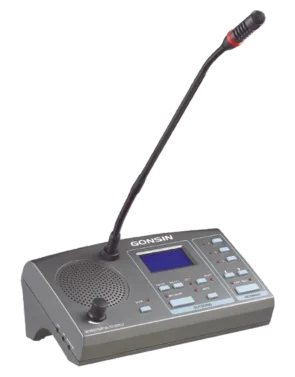
— In compliance with IEC60914 international standard.
— The design of physical buttons/knobs is sensitive with good touch, long service life, and without mechanical button sound.
— It adopts a 25P parallel port (1 male and 1 female) cable for hand-in-hand connection.
— Automatic restoration function: supports hot plug.
— Supports 16 channels simultaneous interpretation (including the floor channel).
— Supports direct interpretation and relay interpretation.
— High brightness 128×64 graphic LCD screen with backlight: displays setting information, input and output channel information.
— Channel selection button: convenient to select the language from all input language channels.
— Indicator for FLOOR/RELAY input channel.
— 3 input channels can be preset with corresponding shortcut buttons and input channel occupancy indicators.
— 2 output channels can be preset with corresponding shortcut buttons. When all interpreter consoles are closed, the output channel can automatically switch to the floor channel.
— Standard cardioid directional electret microphone with indicator ring; multiple soft gooseneck microphone stems available (standard: 410mm, optional: 310mm/510mm).
— Pluggable microphone stem; can be disassembled for equipment maintenance during meeting recess.
— Built-in 2W loudspeaker with volume switch; can play the floor channel or interpreted channel language.
— With the same channel interlock function, when the output channel is preset, the occupied channel will skip automatically.
— MUTE key to enable a brief muting of the microphone for cough cut.
— Speaking speed remind function: the interpreter can press the ‘slow’ key to remind the speaker to slow down the speaking speed (the microphone’s indicator ring or screen will flash).
— Left and right headphone output jack (3.5 mm×2); connect the headset to listen to the floor or interpreted channel language, with left and right selection buttons; headphone volume is adjustable.
— Left and right microphone input jack (3.5 mm×2); can be connected to external microphone, with left and right selection buttons, to meet different usage scenarios.
— Left and right recording output jack (3.5 mm×2); can be connected to recording device, with left and right selection buttons; the output audio depends on the channel listened by the interpreter console.
— Highly resistant to mobile phone interference.
— Interpretation timing function (timing unit: hour/minute).